
Compass (for smartphones)
Author: OskarExecutions: 7843
※ This library was created by a member. This site is not responsible for its content.
Turn your smartphone into a compass. See below for instructions.
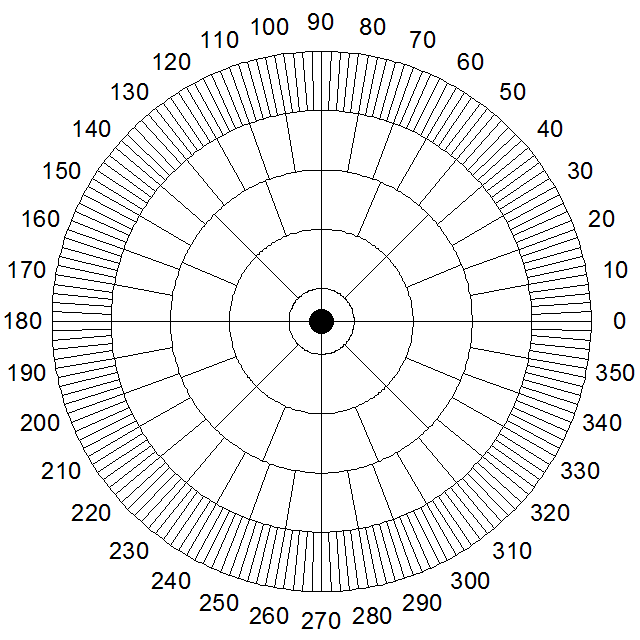
[How to Use]
1. Go outside and stand in the sunlight.
2. Enter your current latitude and longitude.
*You can also use the [GPS] button or the [Google] button.
3. Hold your smartphone so that the screen is level.
4. Place a stick on the ● mark shown in the figure above and stand it upright.
5. Read the angle of the stick’s shadow on the scale shown in the figure above and enter it.
6. Press the [Calculate] button.
7. The direction indicated by the red “needle” is “North.”
[Caution]
・This cannot be used at night. It also cannot be used in dim sunlight, on cloudy days, or during rain or snow.
・Currently, this is for use in Japan only. It cannot be used on Okinotorishima.
・We assume no responsibility whatsoever if you get lost while using this.
・Even if the shadow is faint due to dim sunlight, do not look directly at the sun with the naked eye.
[Meaning of Values in the Table]
X/N/S: For compass graph display
EOT: Equation of Time (minutes)
TDM: Time Difference from Mean Time (minutes)
HA: Hour Angle (°: North is 0°, clockwise)
DEC: Declination (°: positive toward the North Pole (N))
AZ: Azimuth (°: 0° toward the north, clockwise)
ALT: Altitude (°: positive toward the zenith, elevation angle)
ND: Direction of north on the screen (0° to the right, counterclockwise)
1. Go outside and stand in the sunlight.
2. Enter your current latitude and longitude.
*You can also use the [GPS] button or the [Google] button.
3. Hold your smartphone so that the screen is level.
4. Place a stick on the ● mark shown in the figure above and stand it upright.
5. Read the angle of the stick’s shadow on the scale shown in the figure above and enter it.
6. Press the [Calculate] button.
7. The direction indicated by the red “needle” is “North.”
[Caution]
・This cannot be used at night. It also cannot be used in dim sunlight, on cloudy days, or during rain or snow.
・Currently, this is for use in Japan only. It cannot be used on Okinotorishima.
・We assume no responsibility whatsoever if you get lost while using this.
・Even if the shadow is faint due to dim sunlight, do not look directly at the sun with the naked eye.
[Meaning of Values in the Table]
X/N/S: For compass graph display
EOT: Equation of Time (minutes)
TDM: Time Difference from Mean Time (minutes)
HA: Hour Angle (°: North is 0°, clockwise)
DEC: Declination (°: positive toward the North Pole (N))
AZ: Azimuth (°: 0° toward the north, clockwise)
ALT: Altitude (°: positive toward the zenith, elevation angle)
ND: Direction of north on the screen (0° to the right, counterclockwise)
- Related links

No customer feedback for this calculation yet.