
Calculating Natural Luminance (HSL Color Space) | Law of Light Attenuation
Author: Yoshi1610Executions: 133
※ This library was created by a member. This site is not responsible for its content.
Luminance is a value representing brightness in color spaces such as HSL (Hue, Saturation, Luminance), and ranges from 0 (pure black) to 1 (pure white).
The constants a and b are values such that 0 < a ≤ b ≤ 1, representing the minimum (a) and maximum (b) values of the calculated luminance.
The variable `x0` is the initial value of the variable `x` in the calculation formula, where 0 < `x0` ≤ 1.
`x0` represents the initial value of the proportion of the distance measured from `a` toward `b` within the range between `a` and `b`.
For example, if x0 = 0.5, the initial value is set to the distance exactly halfway between the distances corresponding to luminance values a and b.
The variable xI is the increment for x0 in the loop; it is added to x0 repeatedly until it exceeds 1.
The constants a and b are values such that 0 < a ≤ b ≤ 1, representing the minimum (a) and maximum (b) values of the calculated luminance.
The variable `x0` is the initial value of the variable `x` in the calculation formula, where 0 < `x0` ≤ 1.
`x0` represents the initial value of the proportion of the distance measured from `a` toward `b` within the range between `a` and `b`.
For example, if x0 = 0.5, the initial value is set to the distance exactly halfway between the distances corresponding to luminance values a and b.
The variable xI is the increment for x0 in the loop; it is added to x0 repeatedly until it exceeds 1.
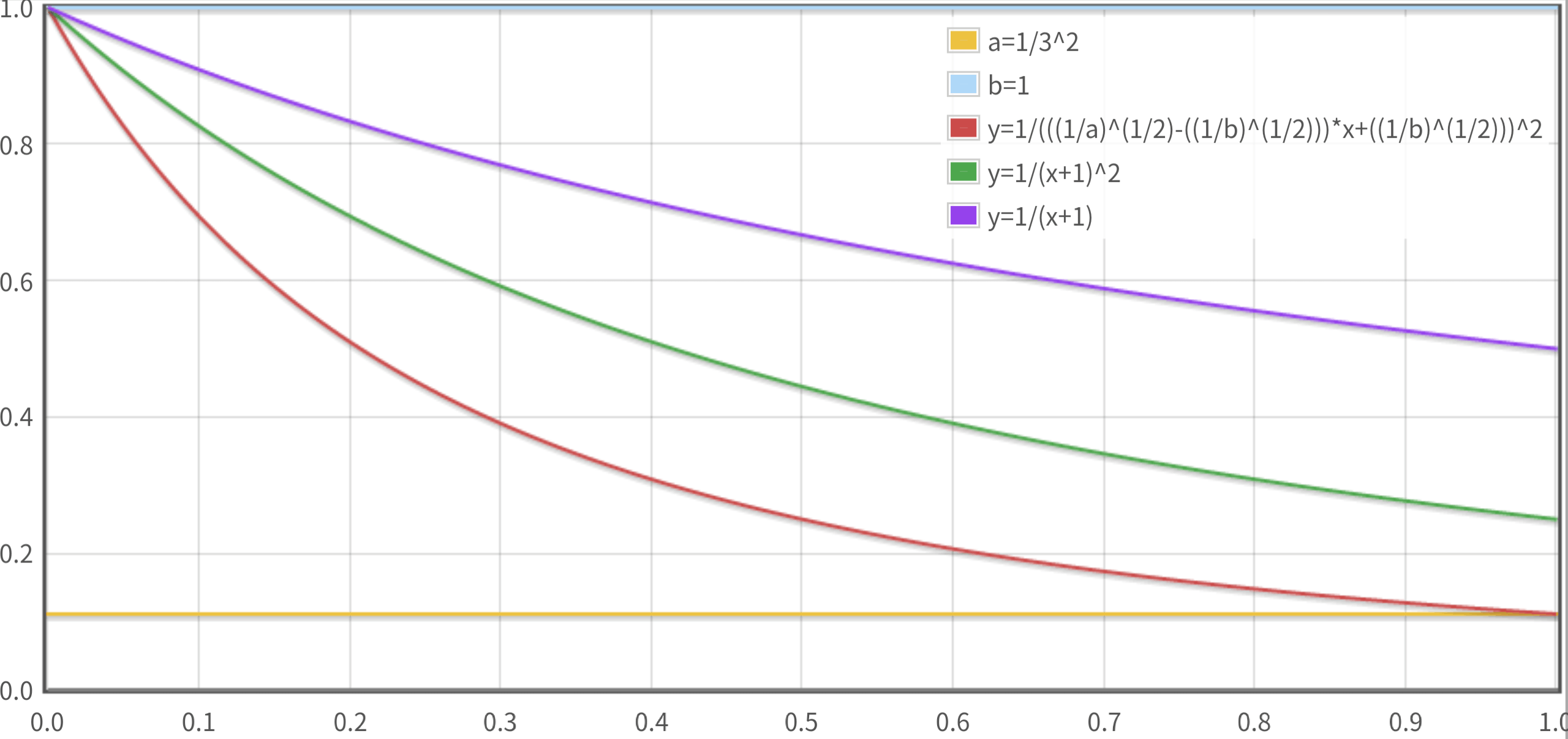
If an invalid value is specified, the calculation may not produce the correct result.
The calculation formula uses the law of light attenuation.
Calculation formula used:
1 / ( ((1/a)^(1/2) - ((1/b)^(1/2)))*x + ((1/b)^(1/2)))^2
The calculation formula uses the law of light attenuation.
Calculation formula used:
1 / ( ((1/a)^(1/2) - ((1/b)^(1/2)))*x + ((1/b)^(1/2)))^2
No customer feedback for this calculation yet.
Please feel free to use this for CSS `hsla()` in dark themes as well.
(This is not a simple inverse proportion! It appropriately corrects for the inverse square law.)