
On-Screen Body Percentage (%) Calculator
Author: j1h6Executions: 44
※ This library was created by a member. This site is not responsible for its content.
Take a photo so that your entire body appears in this percentage (%) relative to the shorter side of the screen.
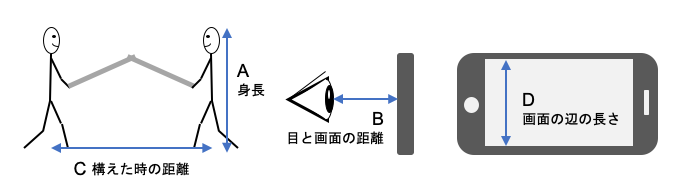
A Height: Enter the tester’s height (cm)
B Distance between eyes and screen (viewing distance): Enter the distance between the eyes and the screen when viewing (cm)
C Distance between two people when positioned: Enter the distance between the two people when positioned. The default value is 2 m.
D Length of the screen’s short side: Measure the display size (in cm) of a smartphone or similar device.
B Distance between eyes and screen (viewing distance): Enter the distance between the eyes and the screen when viewing (cm)
C Distance between two people when positioned: Enter the distance between the two people when positioned. The default value is 2 m.
D Length of the screen’s short side: Measure the display size (in cm) of a smartphone or similar device.
| Proportions of the body on the screen | %Take the photo so that your entire body appears in this proportion relative to the shorter side of the screen. |
The length of the shorter side of the screen can be calculated using the formula below if you know the display size.
Monitor height and width → https://keisan.site/exec/user/1557178360
Monitor height and width → https://keisan.site/exec/user/1557178360
No customer feedback for this calculation yet.